Project variables
Set a value once and reuse it across node parameters, with separate values for each environment.
Declare variables in variables.json, next to flow.json, and bind them to
node parameters, reference them in expressions, or use scalar ones in file and
export paths. A variable can also take its value from a node output; calculated
values are recorded with executions and never written back to variables.json.
Create and edit values
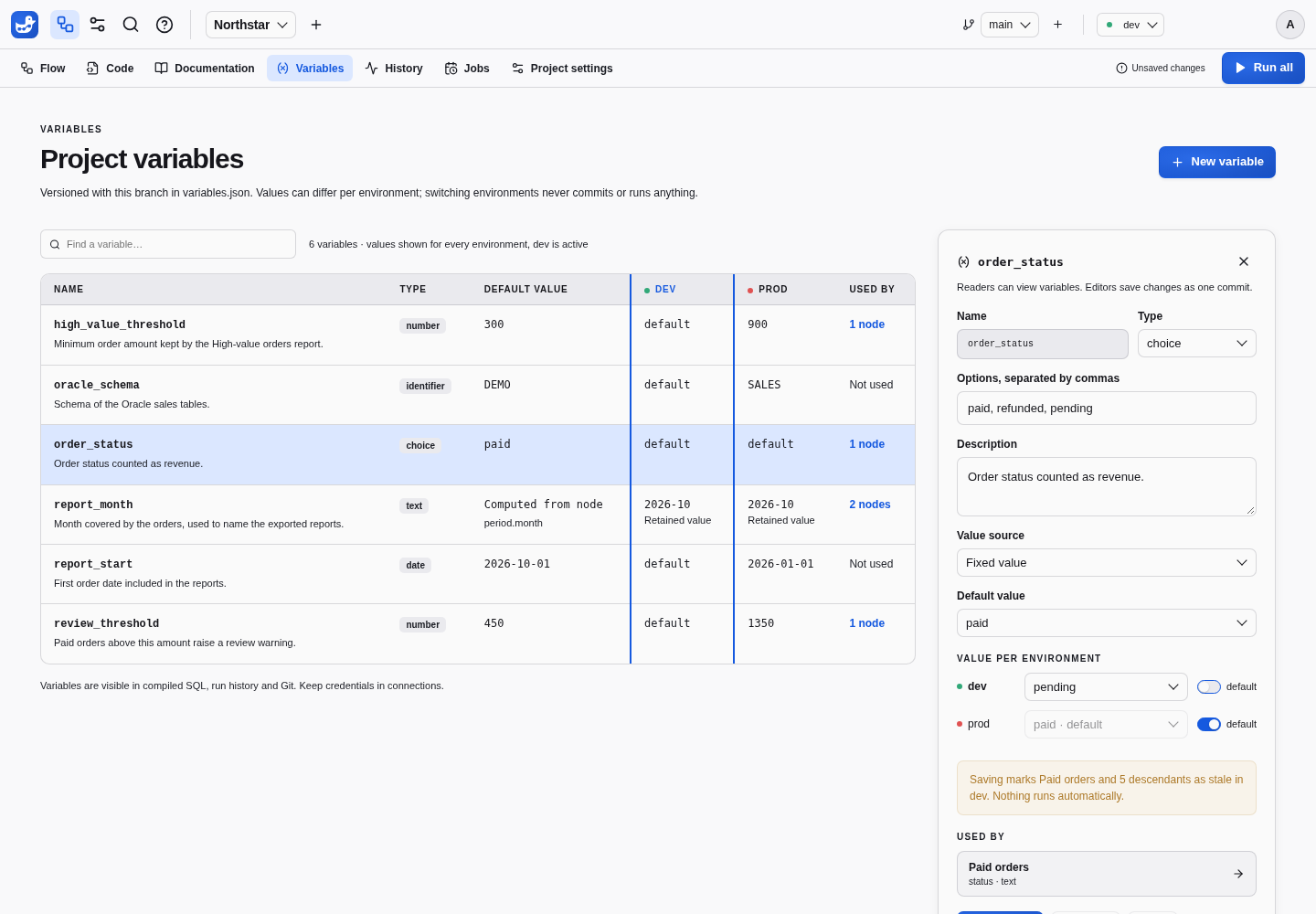
The Variables tab lists each variable with its type, default, value in every
environment and the number of nodes using it. The selected environment’s column
is highlighted, and default marks an environment that inherits the default.
Select a variable to edit its type, description, default and environment values:
turn off Default for an environment to give it its own value. Before you
save, a note names the nodes that the change makes stale and in which
environments; nothing runs automatically. Used by lists the bound parameters
and the expressions that reference the variable, and opens each node in the
flow. Rename… changes the declaration and every reference in one commit,
including {{ var.name }} in expressions, and Delete stays disabled while a
parameter or an expression uses the variable. Readers can browse the tab;
editors and project administrators change it.
Bind node parameters
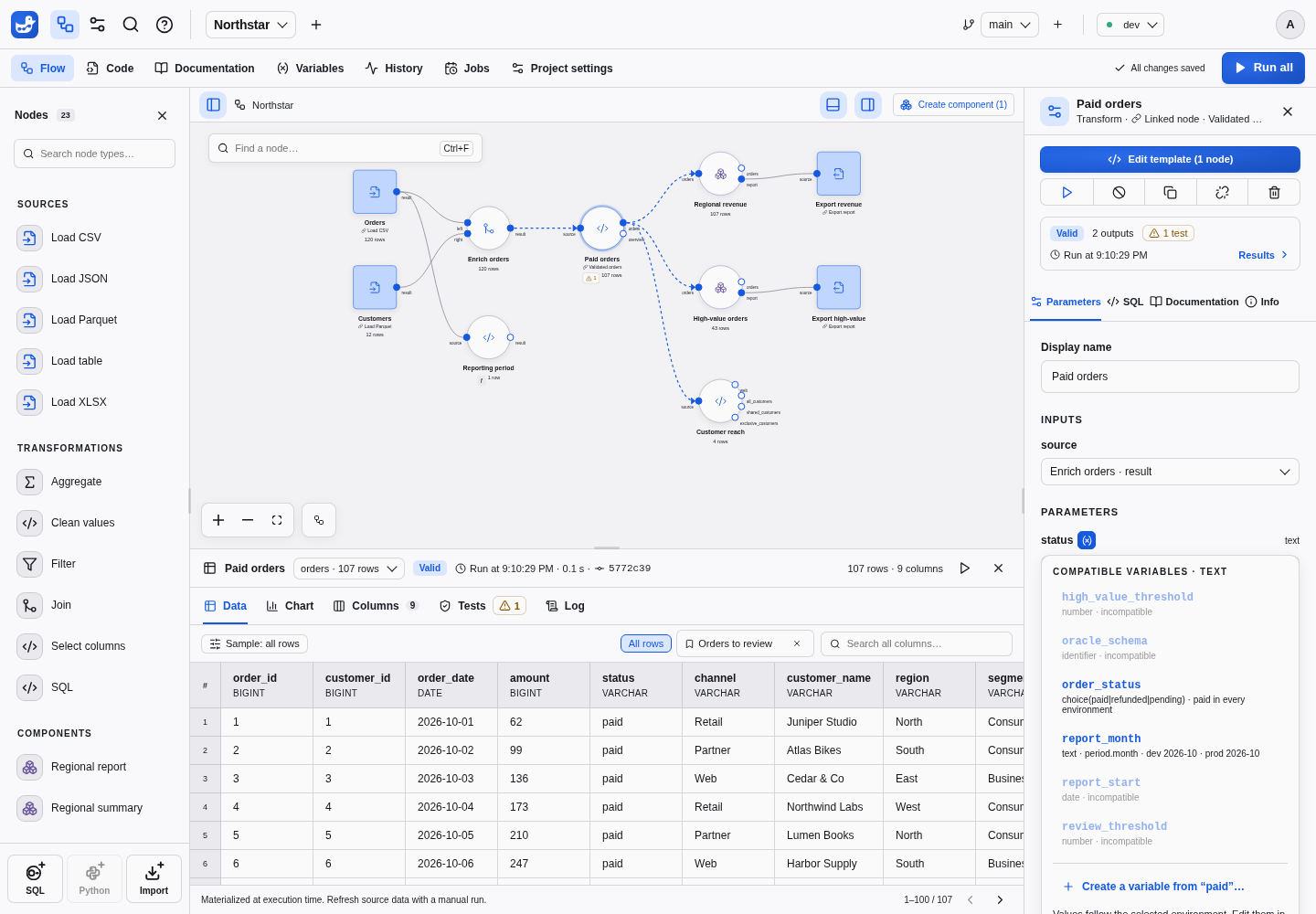
In the inspector, each root flow parameter that a variable can feed has a variable button next to its name. It lists the compatible variables with their values, says which ones are incompatible, and offers Create a variable from ”…”…. That action declares a variable holding the current value and binds the parameter in one save, so results stay valid. A bound parameter shows the variable and its value in the selected environment; the cross restores a fixed value initialized with that value. Parameters of an opened component definition have no variable button: expose them, then bind the instance.
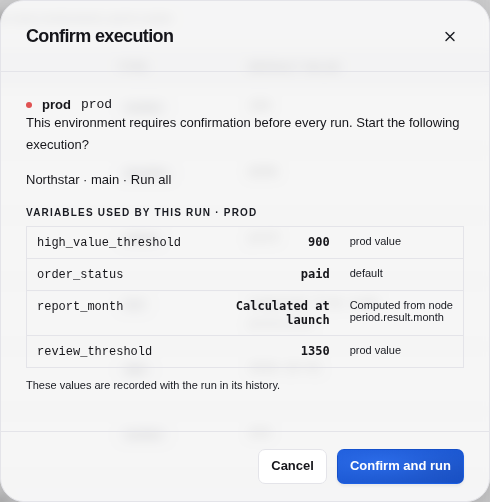
When a variable change makes a result stale, the results panel names the variable, the environment, and its previous and current values. The SQL tab lists each bound variable with its value. An environment that requires confirmation lists the variables of the requested scope, with their values and whether each comes from the default or the environment. The run details in History keep the same list.
File format and types
Code shows variables.json and can create it. You can also edit the file in
an external editor, a project ZIP or through the API. Saves follow the usual
batching, validation and conflict rules.
{
  "high_value_threshold": {
    "type": "number",
    "description": "Minimum order amount kept by the high-value report.",
    "default": 300,
    "environments": {"prod": 900}
  },
  "report_start": {"type": "date", "default": "2026-10-01"}
}
Names use lowercase letters, digits and underscores, starting with a letter.
An ordinary declaration accepts type, description, default and environments.
Computed declarations use from instead of
default and environments. An ordinary value uses the selected environment
override when set, otherwise its default.
| Variable type | JSON value | Binds to parameters of type | Inside an expression |
|---|---|---|---|
text | string | text, file, destination | VARCHAR parameter |
number | finite number | number | numeric parameter |
boolean | true or false | boolean | BOOLEAN parameter |
date | "YYYY-MM-DD" | date | DATE parameter |
choice(a|b) | one of the options | text, and choice or keyword parameters offering every option | VARCHAR parameter |
identifier | non-empty string | identifier, column | not allowed |
list<text>, list<number> | array | the same list type | not allowed |
Bind a whole parameter by replacing its value with a reference in flow.json,
including the value of an exposed parameter on a component instance. The
variable type must suit the template parameter and every typed exposed
parameter that carries the value to it:
{"id": "large", "template": "filter_amount", "params": {"threshold": {"$var": "high_value_threshold"}}}An expression references a variable with {{ var.name }} in its text, as
described in Variables in expressions:
{"id": "recent", "template": "filter", "params": {"condition": "order_date >= {{ var.report_start }}"}}References are allowed only in the root flow. A template, a template parameter default or a component definition that references a variable is an error on that definition, and blocks the nodes built from it: expose the parameter instead, then bind it or write the expression on the instance. Create component does this for you. Each bound parameter of the grouped nodes, and each expression that references variables, becomes an exposed parameter of the new instance, which keeps the same binding or expression, in one save.
Diagnostics
Problems never block more than the nodes concerned:
| Problem | Effect |
|---|---|
Malformed variables.json, invalid name, unknown type or field | File diagnostic; nodes that reference variables are blocked |
| Default or environment value not matching the type | Diagnostic on the variable; nodes using it are blocked where that value applies |
| Reference to an undeclared variable, or to an incompatible type | Diagnostic on the node, which is blocked with its descendants |
identifier or list variable inside an expression, reference inside an unsupported parameter type | Diagnostic on the node, which is blocked with its descendants |
| Reference inside quotes or a comment of an expression | Compilation error on the node |
| No value in the selected environment | The nodes using it are blocked in that environment only |
| Value for an environment this instance lacks, name suggesting a credential | Warning only |
The Variables tab shows these diagnostics on the file or the variable concerned, and the inspector shows them on the bound parameter. An unused variable never blocks anything. Values reach DuckDB as bound parameters, quoted identifiers or escaped paths, never as SQL text, including inside expressions.
Runs, history and Git
A launch resolves the variables of its scope from the committed files and the
selected environment. Results depend on the resolved values only. Changing the prod value makes the prod results of the
nodes that use it and of their descendants stale. Other environments and
unrelated nodes stay valid. Renaming a variable, editing its description, or
binding a parameter to a variable that holds its current value leaves results
valid. Replacing a literal with a reference inside an expression changes the
compiled SQL, so it makes the node’s results stale.
Compare versions lists changed variables with the nodes using them, and their
potential impact reaches the nodes bound to them or referencing them in
expressions. Three-way merges work per variable and per field: a prod value
changed on one side and a description on the other merge cleanly, while two
different prod values are a conflict that the merge review names after the
variable and its field. Two branches that
both create variables.json also merge variable by variable. Variables are not
secrets. Their values are stored in Git, shown in SQL and history, and exported
in ZIP archives; keep credentials in connections.
Variables in expressions
An expression or expressions parameter of the root flow, such as the
condition of a Filter, can reference a variable inside its SQL text:
order_date >= {{ var.report_start }} AND amount >= {{ var.high_value_threshold }}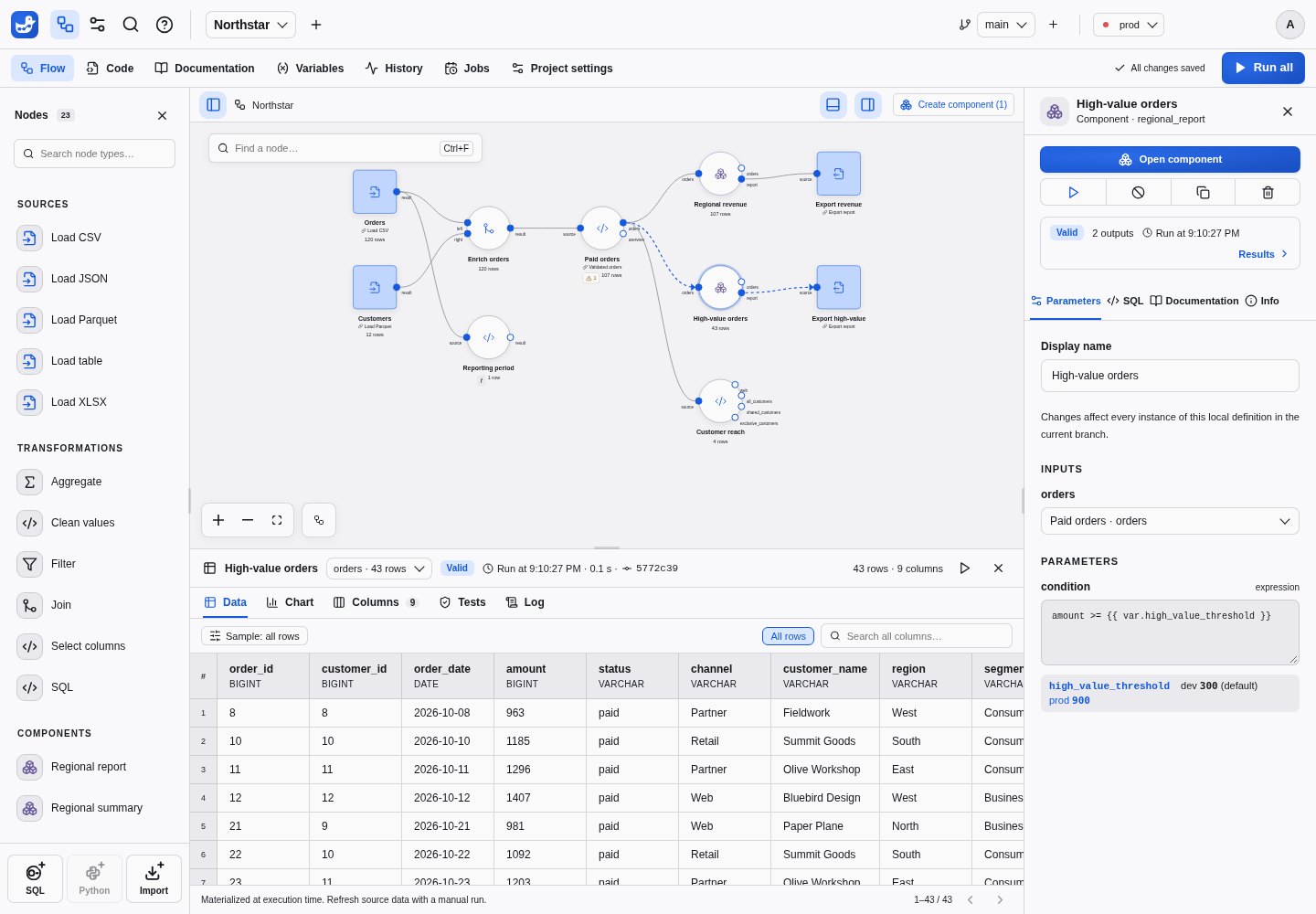
Typing {{ var. in an expression field suggests the variables an expression can
use, with their value in the selected environment; arrow keys choose one, and
Enter or Tab inserts it. Below the field, each referenced variable shows its
value in every environment, the selected one highlighted. The guided Filter
form offers the same variables in its Value source list: choose one instead
of a fixed value to write the reference for you.
The compiler replaces each reference with a named DuckDB parameter, such as
$var_report_start, before validating the expression, and DuckDB receives the
value with its type: it is never inserted into the SQL text. Text and choices
become VARCHAR values, numbers numeric values, booleans BOOLEAN values, and
dates DATE values. identifier and list variables cannot be used inside an
expression: bind a whole column, identifier or list parameter instead. Write
a reference as a value, outside quotes and comments; '{{ var.name }}' is an
error rather than a text containing the value. File and destination parameters
also support path references.
For other parameter types, bind the whole parameter instead.
A variable referenced in an expression counts like a bound parameter: the run
records it, fingerprints include its type and value in each environment, and a
rename keeps results valid. Lineage explanations show the value that was used,
labeled with its variable, for example amount >= 900 (high_value_threshold).
See environments for instance settings and SQL syntax for typed node parameters.
Calculate a value from a node
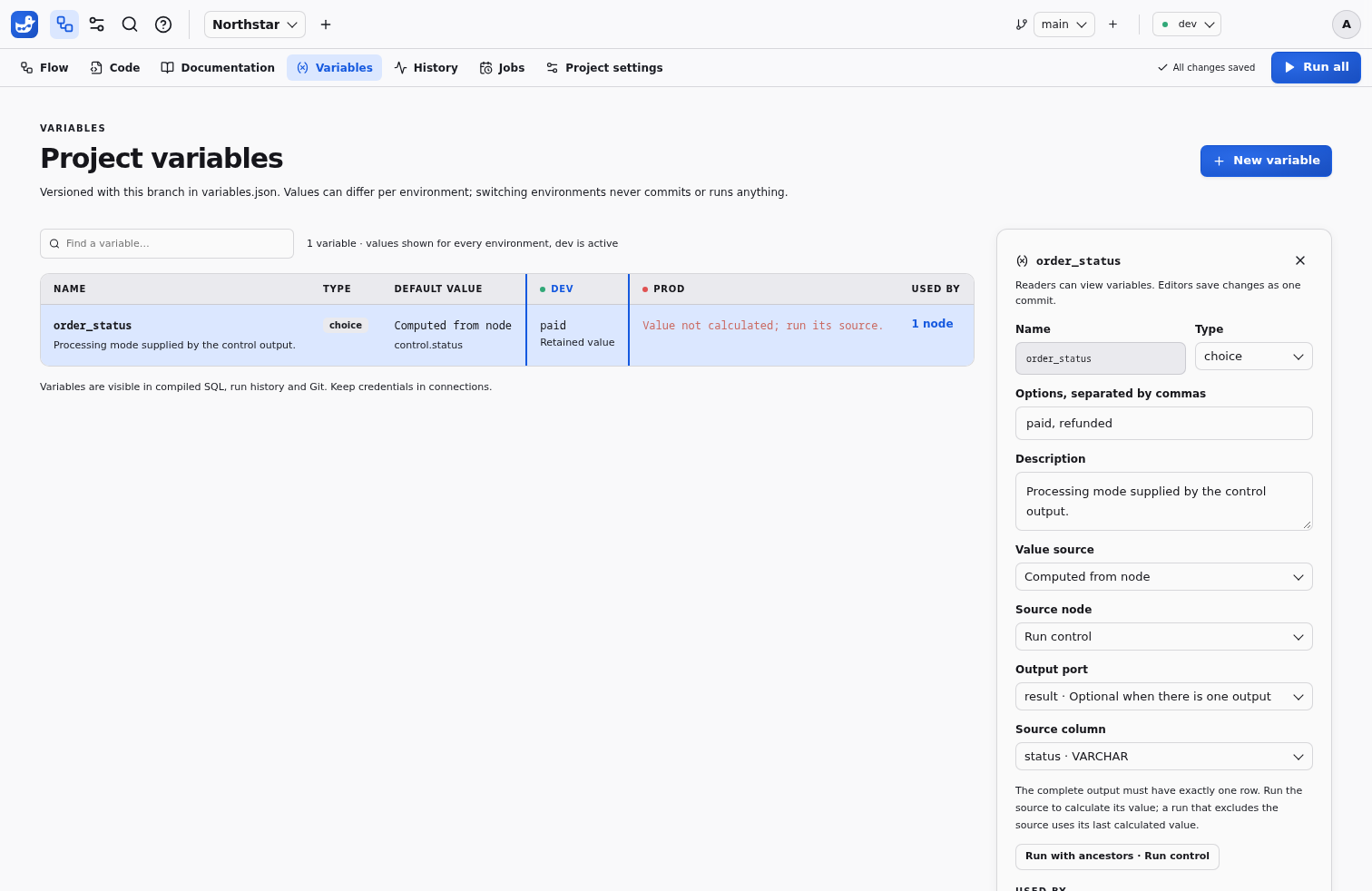
Select Computed from node as the value source in the variable editor. Choose its type, a root node, an output port and a column. The port can be left empty when there is exactly one output. A component instance can supply one of its exposed outputs. Grouping a source updates the declaration to refer to the new instance’s exposed output.
For example, upload run_control.csv:
report_date;mode;with_adjustments
2026-06-30;standard;true
Read it with a CSV source called run_control, then declare:
{
  "report_date": {
    "type": "date",
    "from": {"node": "run_control", "column": "report_date"}
  },
  "mode": {
    "type": "choice(standard|adjusted)",
    "from": {"node": "run_control", "column": "mode"}
  },
  "with_adjustments": {
    "type": "boolean",
    "from": {"node": "run_control", "column": "with_adjustments"}
  }
}
The entire output must contain exactly one row. Duckpad waits for all outputs,
data tests and messages to succeed before extracting values. Zero rows, multiple
rows, NULL and incompatible cells are errors. A bad column blocks its consumers;
other valid columns and independent branches remain usable. Computed declarations
cannot contain default or environments, including empty or null fields.
Conversions use the DuckDB column type. Text and booleans are not coerced from
numbers. Dates accept DATE or valid ISO YYYY-MM-DD text, but not timestamps.
Numbers must be finite; decimals must survive JSON serialization without losing
precision. Lists must already be list cells with compatible, non-null elements.
Use an explicit cast in the producer when its SQL type differs from the declared
variable type.
A pipeline run first calculates included value sources and their upstream nodes, then freezes the values and runs consumers. The toolbar shows these phases and the canvas marks value sources with ƒ. A shared upstream node runs once. Value sources and their upstream nodes may use ordinary variables only; computed value chains and dependency cycles are rejected.
Run with ancestors in the variable editor refreshes its source using the usual launch permissions and protected-environment confirmation. A launch limited to a consumer does not add the value source to its scope: it uses the last successful value retained in that worktree and environment. Without one, run the source or the whole pipeline first. Compile, preview, sample filtering and launch inspection never execute a source themselves.
Changing the producer’s SQL keeps its last successful scalar available and marks the source result stale. Changing the source descriptor or declared type requires a new calculation. A failed refresh never falls back to an older value within that run; the older value remains available for a later consumer-only run. Refreshing an identical typed value preserves out-of-scope consumer results; changing it invalidates those consumers and their data descendants. Real data connections retain their usual invalidation rules.
Retained values disappear when results are evicted or the backend restarts. New worktrees, historical revisions and Jobs do not share them. A Job calculates all value sources included in its scope; a fresh consumer-only Job must include its source to obtain a value. A successful value phase survives a later consumer failure, while a canceled value phase publishes no partial values.
History → Variables, executed SQL and lineage show the immutable values used by that result, their source output and column, and the producing run and commit. A retained value names the earlier run that supplied it. Open source cell opens the recorded cell while that result is available. This explanation remains in run history after results disappear; it does not recreate the live source cell. Protected confirmation shows Calculated at launch for included sources and Retained value with provenance for excluded sources.
Use variables in paths
Both ordinary and computed scalar variables can appear in file, destination
and their connection-bound variants:
{
  "file": "orders/{{ var.report_date }}/{{ var.mode }}/*.parquet",
  "destination": "exports/{{ var.report_date }}_summary.csv"
}
Typing {{ var. offers compatible variables. Text, choices, ISO dates, finite
numbers and booleans are accepted; booleans become true or false. Lists and
identifiers are not path fragments. References are expanded once, without
functions, recursive expansion or general text interpolation. Whole-parameter
{"$var": "name"} bindings retain their existing type compatibility rules.
The resolved path is checked against the captured connection or project-files root. Traversal, absolute paths or symlinks cannot escape that root. URI fragments cannot change the scheme or authority. Permitted globs remain subject to these checks and connection read/write permissions. Apostrophes are escaped as SQL literals. Executed statements retain the original template, referenced variables and resolved resource for inspection.
Rename, Used by, grouping and version comparison include path references. Git
comparison, merge and ZIP export contain declarations only. A computed from
descriptor merges as one unit, so competing source edits require a choice.
Process several values
A computed variable supplies one typed value, which can be a scalar or list cell. To execute a data zone once per row of a control output, declare a data partition dimension. Both editors use the same source node, output and column selector.